Want to identify a song you hear while using Snapchat? The answer depends on which Snapchat version and music-recognition options are available on your device. Older Snapchat versions offered a built-in Shazam experience from the Camera screen, while current Snapchat documentation does not clearly guarantee that the same shortcut is available to every account.
If you still see Snapchat’s music-recognition option, you can use it when a song is playing nearby. If the option is missing, the most reliable alternative is the Shazam app, which can identify music playing around you and can also recognize audio in other apps, including Snapchat.
This guide explains the older built-in Snapchat method, how to use Shazam when watching Snapchat content, where the current Snapchat music tools fit in, why recognition may fail, and what to do when you cannot find a Shazam option.
What Is Shazam on Snapchat?
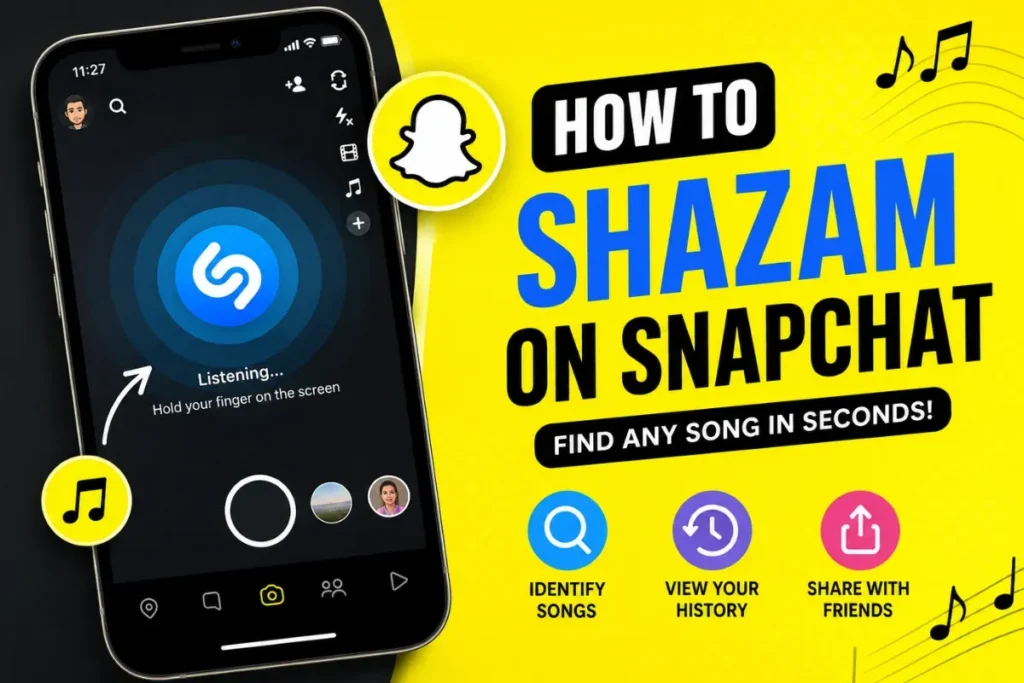
Shazam is a music-recognition service that identifies a song from a short audio sample. Snapchat previously integrated Shazam directly into its Camera experience, allowing users to press and hold the Camera screen while music was playing nearby.
That integration dates back to 2016, when Shazam announced that Snapchat users could identify nearby music by pressing and holding on the Snapchat Camera screen.
However, Snapchat’s current public Support pages do not provide a current universal step-by-step page for the old Shazam shortcut. That means an older tutorial should not be treated as proof that every current Snapchat installation has the same button or menu.
Snapchat does still have music-related features. For example, its Sounds tool lets you browse, search, preview, and use music in Snaps, while Shazam itself can identify music playing in apps such as Snapchat.
How to Shazam on Snapchat
If your Snapchat version still provides the built-in music-recognition shortcut, the traditional process is simple.
Step 1: Open Snapchat
Launch Snapchat and stay on the main Camera screen.
Step 2: Play the Song
Play the music you want to identify from a speaker, television, another phone, or another nearby source. Clear audio gives a recognition service a better chance of finding the correct track.
Step 3: Press and Hold the Camera Screen
Older Snapchat versions used a press-and-hold gesture on the Camera screen to start Shazam recognition. If your current Snapchat version supports this feature, hold on the Camera screen while the music is playing.
Step 4: Wait for Song Recognition
If the feature is available and the song is recognized, Snapchat can display information about the track. The exact interface may differ from older versions of the app.
If nothing happens after pressing and holding, do not assume you are using the wrong gesture. The built-in shortcut may not be available on your current version or account. In that situation, use the standalone Shazam method below.
Can You Shazam Music Playing on Another Device?
Yes. This is one of the easiest ways to identify a song associated with Snapchat.
For example, you can play a Snapchat Story on one device and use Shazam on another device to listen to the audio. You can also use Shazam while music is playing from a speaker, television, computer, or another phone.
- Increase the volume enough for the microphone to hear the track.
- Reduce conversations and other background noise.
- Move the Shazam-enabled phone closer to the sound source.
- Let a recognizable section of the song play.
Shazam’s current Android listing says it can identify music playing around you or in apps such as Snapchat.
How to View Your Shazam History on Snapchat
This is where many older Snapchat guides become confusing. Previous Snapchat versions provided a Shazam history inside Snapchat, but current public Snapchat Support documentation does not provide a universal current path for that old history screen.
If you identify songs with the standalone Shazam app, your recognized tracks can be found in the Shazam Library. Apple documents the Library as the place to revisit previous Shazams.
So if you cannot find a “Shazam” section in Snapchat Settings, do not assume the feature is broken. The menu may no longer be available in your current Snapchat version.
How to Share a Song After Shazaming
After Shazam identifies a track, you can normally open its result and share the song through supported sharing options. Shazam also supports sharing music with friends through Snapchat and other social apps.
- Share the song with a Snapchat friend.
- Copy or share the song result.
- Open the track in a supported music service when available.
- Save the discovery in your Shazam Library.
Available streaming and sharing options can vary by device, country, and the services connected to your Shazam account.
Does Snapchat Need the Shazam App?
If your Snapchat version provides its own music-recognition option, you may not need to install the separate Shazam app just to try that feature.
But if the built-in option is missing, the standalone Shazam app is the practical alternative. Shazam’s current app supports identifying music while you are using other apps, including Snapchat.
On Android, Shazam can also be accessed through notification or Quick Settings-style controls, depending on the device and current app version. Apple documents additional ways to identify music while using another app.
Why Is Shazam Not Working on Snapchat?
If song recognition does not work, first determine whether the problem is the audio itself or whether your Snapchat version simply does not offer the old built-in feature.
Poor Audio Conditions
Music mixed with loud conversations, traffic, television dialogue, or other sounds can be harder to identify. Move closer to the speaker and try again during a clearer part of the song.
Microphone Permission
If Snapchat or Shazam cannot access the microphone when the feature requires it, recognition may fail. Check your device’s app permissions and make sure microphone access is allowed for the app you are using.
Outdated App
Update Snapchat or Shazam through the appropriate app store. Feature availability and interface design can change between app versions.
The Song Is Hard to Match
Live performances, unofficial edits, short clips, remixes, covers, or heavily altered recordings may be more difficult to identify than a standard studio recording.
The Snapchat Shortcut Is Missing
If pressing and holding the Snapchat Camera does nothing, the old built-in Shazam shortcut may not be available to your account or current app version. Use standalone Shazam instead of repeatedly trying an outdated menu path.
How Accurate Is Snapchat Shazam?
Music recognition is not guaranteed to identify every track. Results depend on the quality of the audio sample and whether the recording can be matched against the service’s music database.
- Clear music is easier to recognize than heavily distorted audio.
- Background noise can interfere with recognition.
- Live versions may be harder to match.
- Unreleased or obscure tracks may not have a matching database entry.
If the first attempt fails, try a cleaner section of the same song. You can also use the standalone Shazam app, which provides additional recognition options.
Can Snapchat Identify Songs Playing Inside the Same Phone?
This depends on the device and the method you are using. A standalone Shazam installation can identify music from other apps, including Snapchat, using supported system features. Apple’s documentation also describes Shazam methods that can identify music while another app is open.
If you are relying on Snapchat’s older Camera-based recognition, however, internal audio behavior may not work the same way as external music playing through a speaker.
For a Snapchat video that is already playing on your phone, the simplest current approach is usually to use Shazam’s supported in-app recognition method rather than depending on the old Snapchat shortcut.
Can You Shazam Music From Snapchat Stories?
Yes, you can identify music associated with a Snapchat Story, but the method depends on how you are watching it.
- Story on another device: open Shazam on your phone and let it listen to the Story audio.
- Story on the same phone: use Shazam’s supported in-app recognition feature if available on your device.
- Story with a labeled Snapchat Sound: tap the sound information when Snapchat provides it.
Snapchat’s current music tools can show information for sounds used in Snaps and Spotlight, although the exact availability of music labels and context cards varies.
Is Shazam on Snapchat Free?
The Shazam music-recognition service is available without requiring a Snapchat+ subscription. Shazam’s current app is listed as free, although connected music services and their own subscriptions may have separate requirements.
You do not need Snapchat+ simply because you want to identify a song. The important question is which recognition method is currently available on your device.
Privacy: Does Snapchat Save What You Listen To?
Do not assume that Snapchat is continuously listening to your surroundings. Snapchat’s privacy documentation says audio from the device microphone may be processed when you grant permission and use features that require camera or audio information.
When you deliberately use a music-recognition feature, audio processing is part of that feature’s operation. If privacy is important to you, review the microphone permission for Snapchat and Shazam and only grant access when you are comfortable using the feature.
If you use the standalone Shazam app, Apple says Shazam does not save or store what it hears while using Auto Shazam; identified songs are saved in your Library.
Tips to Get Better Song Recognition
When recognition fails, small changes to the audio environment can make another attempt more useful.
Keep the Phone Close
Place the phone closer to the speaker or other audio source, while keeping the microphone unobstructed.
Reduce Background Noise
Move away from loud conversations or other competing sounds and try again.
Use a Recognizable Section
If possible, let a clear part of the song play instead of a very short or heavily edited clip.
Keep Apps Updated
Update Snapchat and Shazam so you are using the current versions available for your device.
Snapchat Shazam vs the Standalone Shazam App
The two approaches are useful in different situations.
- Snapchat’s built-in recognition: convenient when the option is available directly in your Snapchat Camera.
- Standalone Shazam: more flexible when the Snapchat shortcut is missing or when you want a dedicated music-discovery history.
Shazam’s current app supports music identification in other apps and keeps identified songs in its own Library, making it the more predictable option when Snapchat’s interface has changed.
Common Problems and Quick Fixes
Snapchat Doesn’t Detect Music
- Check microphone permission.
- Move closer to the audio source.
- Reduce background noise.
- Update Snapchat.
- If the built-in shortcut is missing, try standalone Shazam.
Recognition Takes Too Long
Try a louder, clearer section of the track. If the recording is a remix, live performance, or obscure version, another attempt may still fail.
Wrong Song Appears
Try identifying the track again from a different section. Similar recordings, covers, edits, and remixes can sometimes produce a different result.
Frequently Asked Questions
How do I activate Shazam on Snapchat?
If your Snapchat version still offers the built-in recognition shortcut, open the Camera and press and hold the screen while music is playing. If nothing happens, use standalone Shazam because the old shortcut is not guaranteed on every current Snapchat version.
Does Snapchat use the real Shazam service?
Snapchat historically integrated Shazam technology directly into its Camera experience. The partnership was publicly announced in 2016. Current availability of that built-in experience can vary, so older instructions should not be assumed to apply to every account today.
Can I use Shazam on Snapchat without downloading another app?
Only if the built-in Snapchat music-recognition option is available on your current version. Otherwise, install Shazam and use its supported recognition tools while Snapchat is open.
Is Shazam available on Android and iPhone?
Yes. Shazam is available on both Android and Apple devices, with device-specific ways to identify music.
Why can’t Snapchat recognize a song?
Possible causes include poor audio quality, background noise, microphone permissions, an outdated app, an unsupported recording, or the absence of the older Snapchat music-recognition shortcut.
Does Snapchat save my recognized songs?
Do not rely on old guides that promise a current Snapchat Shazam history page. If you use the standalone Shazam app, identified tracks are stored in the Shazam Library.
Final Thoughts
Shazaming music connected to Snapchat is still possible, but the method has changed over time. The classic Snapchat Camera press-and-hold shortcut was a real feature, yet current Snapchat documentation does not guarantee that every account still has the same experience.
If you see the built-in option, use it. If you do not, the standalone Shazam app is the safer current solution because it can identify music in or around other apps, including Snapchat.
Related guides: Snapchat Plus FAQ, Snapchat Plus Hidden Features, Snapchat Planets Not Showing, and Snapchat Green Dot.