Snapchat+ includes more than a subscription badge and a few cosmetic extras. Some of its most useful tools are tucked inside Snapchat+ settings, so they are easy to miss. This guide covers five features worth knowing in 2026, with the current details separated from older or unsupported claims.
Snapchat says Snapchat+ provides premium exclusive, experimental, and pre-release features. The available feature list can change, and some features roll out gradually, so you may not see every option on every account or device.
If you already have Snapchat+, open your Profile and tap the Snapchat+ membership card. That is the main place to find subscription features, settings, and customization options.
My Personal Experience with Snapchat Plus
Instead of presenting a made-up personal story, it is more useful to focus on what Snapchat officially documents. Snapchat+ features change over time, and a feature that appeared in an older guide may not be available in the current app.
That matters especially for so-called hidden features. Some are simply buried in the Snapchat+ menu, while others are experimental or still rolling out. Checking the current settings is more reliable than relying on an old list or a fixed feature promise.
For a broader overview of the subscription, see our Snapchat Plus FAQ, which covers plans, features, Friend Solar System, pricing, and common questions.
1. Custom App Icons: The Aesthetic Game-Changer
Custom App Icons are one of the easiest Snapchat+ features to overlook because the setting is inside the Snapchat+ membership area rather than the normal camera interface. The feature lets subscribers choose a different appearance for the Snapchat icon on their phone.
- Where to find it: Open your Profile and tap the Snapchat+ membership card.
- Next: Tap App Icon and choose an available icon.
- If it does not appear: Snapchat may not have made the option available to your account or current app version yet.
Snapchat’s support documentation confirms that Snapchat+ subscribers can choose a unique appearance for the app icon. Snapchat also notes that you may need to restart your device before the updated icon appears.
Do not confuse App Icon with Custom App Themes. Snapchat+ also offers broader app customization, including themes and controls for parts of the app interface, but availability can vary because some customization features roll out gradually.
2. Ghost Trails: The “Where Were You?” Tool
Ghost Trails needs an important clarification in a current 2026 guide. Older Snapchat+ articles have described Ghost Trails as a paid Snap Map feature, but Snapchat’s current official Snapchat+ feature list does not list Ghost Trails among the subscription features.
Because of that, you should not assume that a Snapchat+ subscription automatically gives you access to a 24-hour location-history trail for friends. Location visibility on Snap Map depends on the friend’s location-sharing settings, and Ghost Mode can hide a person’s location from other people on the Map.
Why It’s Better in 2026:
The important 2026 takeaway is accuracy: do not use an old Ghost Trails tutorial as proof that a current Snapchat+ account has the feature. If you are looking for location tools, check your current Snap Map and Privacy Controls instead.
Snapchat’s support information confirms that Ghost Mode can hide your location from other people on the Map. Location-sharing features should always be understood through the settings that control who can see your location.
3. The Story Rewatch Count (and the “Eyes” Emoji)
The Story Rewatch Indicator is a genuine Snapchat+ feature and one of the easiest tools to miss. When available, an eyes emoji can appear under a Story you posted, showing how many friends rewatched it.
- What it shows: The number of friends who rewatched your Story.
- What it does not show: The names of the friends who rewatched it.
- What the number means: It counts friends, not the total number of replay events.
- Where to manage it: Profile → Snapchat+ membership card → Story Rewatch Count.
This distinction is important. If one friend watches your Story several times, the indicator is not a running total of every replay. Snapchat specifically describes the number as the count of friends who rewatched the Story.
The Rewatch Indicator is also different from Story View Notifications. Both are Snapchat+ features, but they provide different information and should not be treated as the same tool.
Snapchat Plus Features Comparison (2026)
| Feature | What it does | Important note |
|---|---|---|
| Custom App Icon | Changes the Snapchat icon on your phone | Availability and icon choices can vary |
| Story Rewatch | Shows how many friends rewatched your Story | Does not identify the friends |
| Custom Story Expiration | Lets you choose how long a My Story Snap remains available | Several timer options are available |
| Priority Story Replies | Moves eligible replies higher in a creator’s Story Replies list | Applies to eligible public/community Stories |
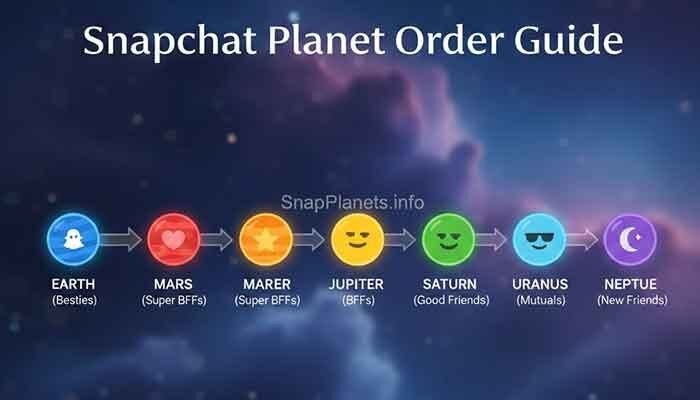
| Solar System | Shows your position among a friend’s Best Friends using planets | Requires the relevant Snapchat+ feature to be enabled |
For the planet side of Snapchat+, you can also read our Snapchat Top 8 Friends guide to understand how Best Friends and Friend Solar System positions relate.
4. Custom Story Expiration: Breaking the 24-Hour Rule
Snapchat Stories normally have a 24-hour lifespan, but Snapchat+ subscribers can use the My Story Timer to choose a different expiration period. This is useful when you want a Story to disappear sooner or stay available for several days.
According to Snapchat’s current support documentation, the available timer choices are:
- 1 hour
- 6 hours
- 12 hours
- 24 hours
- 2 days
- 3 days
- 1 week
To use it, take a Snap, tap Send To, choose My Story, and then select the available timer option before posting. The exact interface can change as Snapchat updates the app.
This is a better option than relying on the old idea that every Snapchat Story must remain live for exactly 24 hours. Snapchat+ gives subscribers more control over that window.

5. Priority Story Replies: Getting Noticed
Priority Story Replies are another Snapchat+ feature that can be easy to overlook. When a Snapchat+ subscriber replies to an eligible Public or Community Story where the creator can respond, the reply receives higher placement in the creator’s list of Story Replies.
Snapchat says subscribers see a gold ring around the reply field for eligible content. From the creator’s side, replies from Snapchat+ subscribers are prioritized above other Story Replies.
That does not mean a creator must answer the message. Priority placement simply gives the reply a better chance of being seen. It should not be described as a guarantee of a response or a way to force a creator to notice you.
FAQ: What People are Asking on Reddit
Q: Can people see if I have Snapchat Plus?
A Snapchat+ subscriber can choose to display the Snapchat+ badge. The badge is a separate visibility setting, so having the subscription does not mean the badge must always be displayed.
Q: Does the Story Rewatch Indicator tell me names?
No. Snapchat says the eyes indicator shows how many friends rewatched your Story, not which friends did it.
Q: Is Ghost Trails a current Snapchat+ feature?
Do not assume it is. Snapchat’s current official Snapchat+ feature list does not list Ghost Trails. Older articles may still describe it, so check the current app and Snapchat Support before relying on those instructions.
Q: Can I get Snapchat Plus for free?
Snapchat may offer trials or promotions to eligible users, but availability can vary. The safest way to check is through the official Snapchat app. Avoid modified APKs or websites asking for your Snapchat login in exchange for a free subscription.
Q: Do all Snapchat+ users get every feature?
No. Snapchat says some features are experimental, pre-release, or rolling out gradually. Your device, account, country, or app version can affect what you see.
Conclusion
Snapchat+ has several useful features that are easy to overlook because they live inside the membership settings rather than the main camera screen. Custom App Icons, Story Rewatch, Custom Story Expiration, and Priority Story Replies are all documented Snapchat+ features.
Ghost Trails needs more caution. It appears in older Snapchat content, but it is not listed on Snapchat’s current official Snapchat+ feature page. That is why checking the latest support information matters when reading a 2026 guide.
If your main reason for subscribing is Friend Solar System, remember that Snapchat+ includes other tools too. You can explore our Snapchat Plus free trial and planets guide for more information about that feature.
Bottom line: Snapchat+ is not just about the badge. Its value comes from the collection of premium tools, customization options, and experimental features available on your account. Since Snapchat changes this feature set regularly, always check your Snapchat+ membership page for the options currently available to you.