
Want to give someone Snapchat+ or redeem a Snapchat+ gift card? The process depends on the type of gift you have. Snapchat currently supports both in-app Snapchat+ gifts and gift cards purchased through third-party retailers. The redemption steps are different, so using the correct method can save you a lot of confusion.
This guide explains how to buy Snapchat+ for a friend, how to redeem a third-party Snapchat+ gift card, who can redeem one, and how the Friend Solar System relates to your Snapchat+ subscription.
What Is a Snapchat+ Gift Card?
A Snapchat+ gift card is a way to give access to a Snapchat+ subscription through a gift card purchased from a third-party retailer. Snapchat says third-party Snapchat+ gift cards can be redeemed through snapchat.com/plus, rather than by entering the card information into a normal in-app subscription screen.
It is important to distinguish a third-party gift card from a Snapchat+ gift purchased directly inside the Snapchat app. Both provide Snapchat+ access, but the purchase and redemption process is different.
How to Buy Snapchat+ for a Friend

There are two main ways to give Snapchat+ to another person: an in-app Snapchat+ gift or a third-party gift card.
Option 1: Gift Snapchat+ Directly in the App
Snapchat+ subscribers can gift a subscription to friends directly from the Snapchat app. Snapchat currently lists gift periods of 3 months, 6 months, or 12 months.
- Open Snapchat and go to My Account or your Profile.
- Tap your Snapchat+ membership card.
- Tap Gift Snapchat+.
- Select the friend you want to gift.
- Choose the gift duration.
- Follow the payment instructions through the Apple App Store or Google Play, depending on your device.
Snapchat says in-app gifts are one-time purchases rather than recurring subscriptions. The person receiving the gift also needs to meet Snapchat’s eligibility requirements.
Option 2: Buy a Third-Party Snapchat+ Gift Card
Snapchat also supports gift cards purchased through third-party retailers such as Amazon or Target. If you choose this option, check the retailer’s terms and conditions before purchasing because eligibility and availability can depend on the card and the country where it was purchased.
Do not assume that every generic store gift card is a Snapchat+ gift card. Look for a card or code specifically intended for Snapchat+ and keep the purchase information until the code has been successfully redeemed.
How to Redeem a Snapchat+ Gift Card
If you purchased a Snapchat+ gift card from a third-party retailer, Snapchat’s official instructions are straightforward. The redemption is completed on the web.
Step-by-Step Redemption
- Go to snapchat.com/plus.
- Select Redeem Gift Card.
- Sign in to your Snapchat account, or create an account if you are new to Snapchat.
- Choose the available subscription when prompted.
- Enter the gift card information.
- Select Redeem and follow any remaining on-screen instructions.
Snapchat’s support documentation says third-party Snapchat+ subscriptions can currently be redeemed only by subscribers in the United States. Always check the terms supplied with your specific gift card before buying or attempting to redeem it.
What Is the Difference Between a Gift Card and an In-App Gift?
The easiest way to avoid mistakes is to identify which type of Snapchat+ gift you received.
- Third-party gift card: Redeem it through snapchat.com/plus.
- In-app Snapchat+ gift: Open Snapchat, go to Snapchat+, choose Gift Snapchat+, and access received gifts from the gifting section.
- Promo code: Follow the redemption instructions supplied by the Snapchat partner that issued the code. Promo-code eligibility can be different from gift-card eligibility.
How Snapchat+ Gifts Work With an Existing Subscription
If you already have Snapchat+ and receive an in-app gift, Snapchat says your gift period can begin after your existing subscription period ends. Snapchat also notes that you may need to cancel an existing subscription before redeeming the gift, depending on your subscription situation.
This is why it is better to check your current subscription before trying to redeem a gift. You do not want to cancel or change a subscription without first understanding when your existing paid period ends.
How Do Snapchat Planets Work With Snapchat+?
One reason Snapchat+ is popular is the Friend Solar System. When the feature is available and enabled, it represents your position in another person’s Best Friends list using planets.
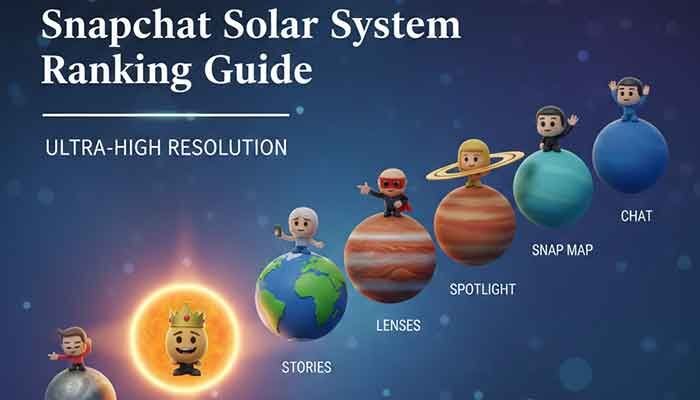
The important point is that buying or redeeming Snapchat+ does not automatically make one particular friend your Mercury, Venus, or another planet. The planets represent positions in the Best Friends ranking, which can change as your interactions change.
- Mercury: 1st position
- Venus: 2nd position
- Earth: 3rd position
- Mars: 4th position
- Jupiter: 5th position
- Saturn: 6th position
- Uranus: 7th position
- Neptune: 8th position
So, if your goal is to see Friend Solar Systems, the gift gives you access to the Snapchat+ feature; it does not guarantee a specific planet position with a particular friend.
Why Can’t I Redeem My Snapchat+ Gift Card?
If the redemption does not work, check the basics before trying the code repeatedly.
- Check your region: Snapchat says third-party Snapchat+ subscriptions can currently be redeemed only in the United States.
- Check the retailer’s terms: Make sure the card is valid for your account and has not expired or already been redeemed.
- Use the correct website: Third-party Snapchat+ gift cards should be redeemed through snapchat.com/plus.
- Check your account: Make sure you are signed in to the Snapchat account where you want the subscription.
- Contact the seller if necessary: If the card itself is invalid, the retailer may need to help with the purchase or code.
Frequently Asked Questions
Can I redeem a Snapchat+ gift card in the Snapchat app?
For a third-party Snapchat+ gift card, Snapchat’s official instructions direct you to snapchat.com/plus and the Redeem Gift Card option. In-app gifts have a separate redemption process.
Can I gift Snapchat+ to someone who already has Snapchat+?
Snapchat says in-app Snapchat+ gifts are for friends who do not already have a subscription. If a gift is received while another subscription is active, Snapchat provides specific rules about when the gift period begins.
Does a Snapchat+ gift automatically renew?
No. Snapchat describes its in-app gifts as one-time purchases rather than recurring subscriptions. Your normal subscription billing and a gifted subscription should not be treated as the same thing.
Will buying Snapchat+ guarantee that I become someone’s Mercury?
No. Snapchat+ provides access to features such as the Friend Solar System, but your planet represents a position in the Best Friends ranking. It does not guarantee a particular rank.
Can I use any gift card to pay for Snapchat+?
Not every gift card is a Snapchat+ gift card. A third-party Snapchat+ gift card has its own redemption process, while subscriptions purchased through Apple or Google can use the payment methods supported by those platforms.
Final Takeaway
If you want to give Snapchat+ to a friend, the simplest option is usually the in-app gifting feature when both the sender and recipient are eligible. If you have a third-party Snapchat+ gift card, use snapchat.com/plus and select Redeem Gift Card rather than searching through the app settings.
Most importantly, do not confuse a Snapchat+ gift card with a promo code or a generic App Store or Google Play gift card. Each type follows different rules. And if your main reason for getting Snapchat+ is Friend Solar System, remember that the subscription gives you access to the feature, while the actual planet position depends on the Best Friends ranking.