If you think someone may have blocked you on Snapchat, there is no direct “you were blocked” alert to confirm it. Instead, you have to compare several signs, because the same behavior can also happen when someone removes you, changes privacy settings, or deletes their account.
The clearest approach is to look at more than one clue. If the person’s account disappears from your search, you cannot contact them, and another Snapchat account can still find them, that combination provides much stronger evidence than a single missing Story or a pending message.
This guide explains what blocking changes, the signs to check, how blocking differs from removing a friend, what happens to Chats and Stories, and how to protect your own Snapchat privacy.
What Happens When Someone Blocks You on Snapchat?
Snapchat says blocking is designed to stop direct communication and interaction between the blocked account and the person who blocked it. A blocked user cannot send the blocker Snaps or Chats, and the blocker no longer appears normally in places such as Search, Best Friends, or Quick Add for the blocked account.
- You cannot normally send the person Snaps or Chats.
- Their account can disappear from your Search results.
- You will no longer receive their Stories or normal direct updates.
- Their name can disappear from your Friends Feed.
- Your previous one-on-one Chat may no longer be visible.
- Their Snap Map location is hidden from you.
There is an important exception for shared Group Chats. Blocking someone does not automatically remove either person from a shared Group Chat. You may still see messages they send to that group, even though private communication between you is blocked.
Snapchat does not send the blocked person a notification saying that they have been blocked. However, the person may work it out from changes in search, profile visibility, Stories, and communication.
Signs Someone Blocked You on Snapchat
No single sign proves a block in every situation. The strongest approach is to compare several changes and rule out other explanations first.
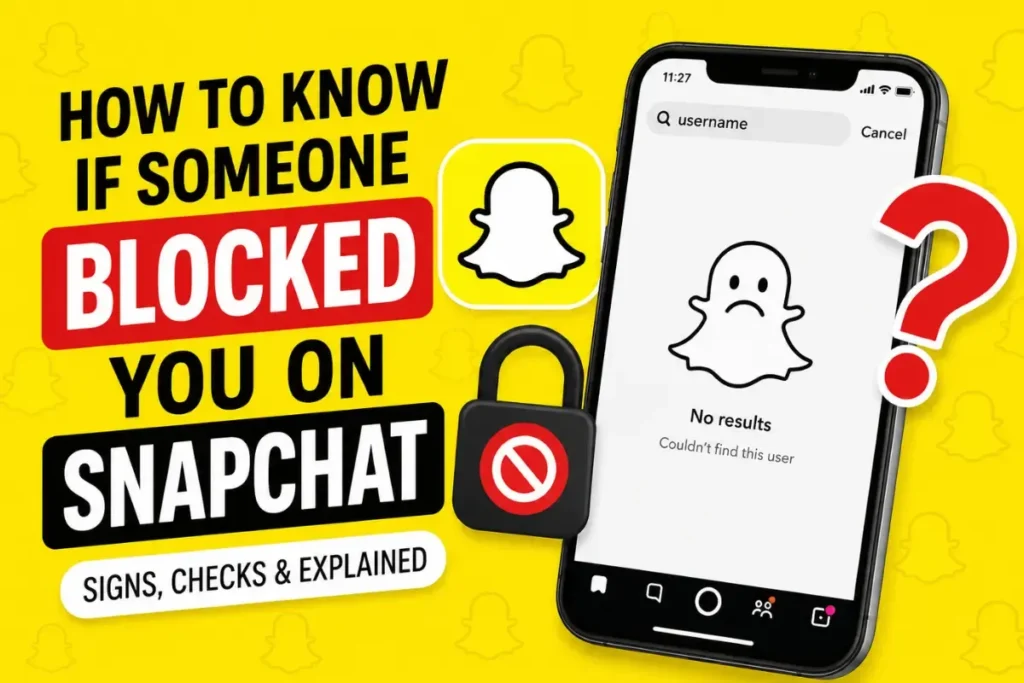
1. You Cannot Find Their Username in Search
Search is one of the first places to check. Snapchat’s current support information says blocked users will not see the blocker in Search results.
How to Check
- Open Snapchat.
- Tap the Search option.
- Enter the person’s exact username or the name you previously used to find them.
If the account no longer appears for you, blocking is one possible explanation. It is not the only one. The person could have changed their username, deleted or deactivated the account, or you could be searching for an outdated username.
For that reason, search becomes much more useful when you compare it with another account or another trusted person’s search results.
2. Old Chats Disappeared
Blocking can affect an existing one-on-one conversation. Snapchat says that when you block someone, active one-on-one conversations are no longer visible from your perspective.
What to Look For
- The person’s conversation is no longer visible.
- Their profile is no longer accessible from the old conversation.
- You can no longer use the Chat normally.
Saved messages can also be affected when people are no longer friends. Snapchat notes that saved one-on-one messages may be removed from its systems over time after users remove or block each other. Therefore, a missing Chat can support the possibility of a block, but it should not be treated as a unique proof.
3. Your Messages Stay Pending
A message that cannot be delivered can be another clue, but Pending does not automatically mean blocked. Delivery problems can have several causes, including friendship status, account changes, or other Snapchat conditions.
Message Status on Snapchat
Snapchat can show different states as messages and Snaps move through the app. If communication repeatedly fails after the person’s profile also disappears from Search, the combination is more meaningful than the pending status by itself.
- They may have blocked you.
- They may have removed you as a friend.
- The account may have changed or been deleted.
- Your message may not be eligible for delivery under the current privacy settings.
Do not use a single pending message as a final answer.
4. Their Snapchat Score Disappears
If you previously saw a friend’s Snap Score and can no longer see it, the friendship relationship may have changed. However, the disappearance of a score is not a standalone Snapchat block detector.
Important Note
Snapchat’s current support information distinguishes blocking from removing a friend. When someone is removed, they are taken off the Friends list but may still be able to see public content, depending on privacy settings. Because of these differences, a missing score should be interpreted together with stronger account-visibility clues.
5. You Cannot View Their Stories
If someone who regularly appeared in your Stories suddenly disappears, that can be another clue. A person who blocks you will no longer show you their Stories through the normal friendship relationship.
- You stop seeing their normal Stories.
- You cannot open their profile to check the friendship normally.
- Direct communication with the account is unavailable.
But Story disappearance is not proof by itself. Snapchat users can stop posting, mute or change what they share, change their Story audience, or remove friends. Public Stories also work differently from friends-only Stories.
6. Their Profile Completely Vanishes
A combination of profile disappearance, failed communication, and missing Search results is more significant than any one symptom. Snapchat says blocked accounts no longer appear in Search results for the person who was blocked.
- The account no longer appears in Search.
- The person’s profile is no longer accessible normally.
- You cannot send them Snaps or Chats.
- Their name may disappear from your Friends Feed.
Even then, check whether the account can be found from another account before treating the result as conclusive. An account that has been deleted will also disappear from searches.
How to Confirm If Someone Blocked You on Snapchat
Snapchat does not give the blocked person a direct confirmation. The most useful confirmation method is therefore to compare what your account can see with what another account can see.
Use these checks respectfully. Do not create fake accounts to evade a block or repeatedly contact someone who has chosen to restrict communication.
Method 1: Search From Another Account
If you already have access to another legitimate Snapchat account, you can compare the search result without attempting to contact the person.
Steps
- Search the person’s username from your account.
- Note whether the profile appears.
- Use a separate account that you legitimately control, or ask a trusted person to search the same username.
- Compare the results.
Results
- If the profile appears for another account but not yours, a block is a strong possibility.
- If the profile does not appear anywhere, the account may have been deleted, changed, or otherwise become unavailable.
This comparison is more useful than repeatedly refreshing your own Search results.
Method 2: Ask a Friend to Search
If you do not have another account, you can ask a trusted friend to search for the exact username. This can help distinguish an account-wide disappearance from a change that affects only your account.
Ask them only to check whether the account exists. There is no need to ask them to contact the person or interfere with their account.
- Search the exact username.
- Check whether the profile appears.
- Confirm whether the account is active.
If your friend can find the profile while you cannot, blocking becomes a stronger explanation. If nobody can find it, an account change or deletion is also possible.
Method 3: Check Recent Conversations
Look at your existing Chat history and compare what is available now with what you could access before.
Signs Inside Chat
- The one-on-one conversation is no longer visible.
- You cannot open the person’s profile from Chat.
- New messages cannot be delivered.
- The normal friendship options are unavailable.
These clues are useful when combined with the Search test. A Chat problem alone can have other causes, so avoid treating it as proof of a block.
Difference Between Blocked and Removed on Snapchat
Blocking and removing are not the same action. Snapchat says blocking stops direct interaction, while removing someone takes them off your Friends list but can still leave some public-content access depending on privacy settings.
After a friend is removed, the person may still be able to view content you have made public, and depending on your privacy settings they may still be able to Chat or Snap you. Blocking is more restrictive.
If you can still find the person and the app gives you an option to add them again, removal is more consistent with that behavior than a complete block.
Quick comparison:
| What you notice | More consistent with removal | More consistent with blocking |
|---|---|---|
| Profile can still be found | Often possible | Normally no |
| Public content may remain visible | Yes, depending on privacy | Blocked users may still see public content from the blocker |
| Direct Snaps/Chats | May still be possible depending on settings | Blocked |
| Search visibility | May remain | Blocked account does not appear in Search for the blocked user |
What Does “Pending” Mean on Snapchat?
Pending means Snapchat has not delivered the message or Snap in the way you expected. It is a status, not a direct statement that another user blocked you.
Possible Reasons
- You may no longer be friends.
- The recipient may have changed how they receive messages.
- The account may have been deleted or changed.
- A block may have occurred.
- There may be a temporary app or connection problem.
Look for additional evidence before reaching a conclusion. Search visibility and whether another account can find the profile are more useful comparison points.
Can You Still See Old Messages If Blocked?
Not necessarily. Snapchat says that when someone blocks another user, the active one-on-one conversation is no longer visible from the blocker’s perspective, and saved messages may be removed when people are no longer friends.
That means you should not assume that every old saved message will remain accessible after a block. Snapchat also says that if someone is blocked, they cannot see the Chat anymore.
If an old conversation remains visible temporarily, that does not necessarily disprove a block. App state, saved content, and changes after the block can affect what you see.
Can Someone Block You and Still View Your Stories?
There is an important distinction here. Snapchat says a blocked user will no longer see the blocker’s Stories or Charms through the normal relationship. However, Snapchat also states that a person who has been blocked can still view content the blocker posts publicly, such as Public Stories or Spotlight content.
So the answer is not simply “no” for every type of Story. Public content has different visibility rules from friends-only or private content.
This is one reason older guides can be misleading when they say blocking makes every piece of public content invisible.
Does Snapchat Notify You When Blocked?
No direct block notification is sent to the person who has been blocked. Snapchat’s support documentation says the blocked person will not receive a notification, although they may realize something changed because they can no longer view the profile or contact the blocker normally.
That privacy design is why you have to rely on observable account behavior rather than an official “blocked” message.
Can You Message Someone Who Blocked You?
No. Snapchat says a blocked person cannot send the blocker Snaps or Chats. The direct communication channel is cut off.
- New direct Chats cannot be sent normally.
- Snaps cannot be sent to the blocked account.
- Normal one-on-one interaction is unavailable.
- The account will not appear normally in Search for the blocked user.
If you share a Group Chat, the block does not automatically remove either person from that group. Group communication can continue separately from private communication.
Can You Re-Add Someone After Being Blocked?
You cannot normally add someone while they have blocked you because the account is not available to you in the normal way. If they later unblock you, the situation can change and you may be able to find or add them again.
Snapchat provides an unblock option in Settings for the person who created the block. Unblocking allows the other person to send Snaps and Chats and view Stories again, although previous Chat history may not fully return.
Why People Block Others on Snapchat
There is no single reason why someone blocks another account. Blocking is a privacy and communication control, and different people may use it for different reasons.
- They want fewer unwanted messages.
- They want to control who can contact them.
- They are setting a personal boundary.
- They are dealing with spam or harassment.
- They want to reduce unwanted interactions.
- They want to manage who can access their non-public content.
A block by itself does not tell you why the person made that decision. It is better to focus on the account behavior you can actually verify rather than guessing about the person’s motives.
What to Do If Someone Blocked You on Snapchat
If you confirm that someone blocked you, the most practical response is to respect the boundary. Trying to bypass the block can create further problems and does not restore normal communication.
Things You Should Avoid
- Do not create fake accounts to get around the block.
- Do not repeatedly send friend requests from other accounts.
- Do not pressure mutual friends to contact the person for you.
- Do not harass or threaten the person.
Better Options
- Respect the person’s decision.
- Use your own privacy settings to control your account.
- Keep communicating with people who want to stay connected.
- If the situation involves harassment or safety concerns, use Snapchat’s reporting tools.
If you believe the block is connected to a safety issue, avoid escalating the situation through another account. Use the platform’s official support and reporting options instead.
Common Myths About Snapchat Blocking
Snapchat blocking generates many guesses online. Here are some of the most common misconceptions.
Myth 1: Pending Always Means Blocked
False. Pending can have several causes. Treat it as one clue rather than proof.
Myth 2: Snapchat Sends a Blocking Alert
False. Snapchat does not send the blocked person a direct notification.
Myth 3: You Can Bypass a Snapchat Block
False. A block is specifically intended to stop direct interaction. Creating another account to evade someone’s privacy choice is not an appropriate way to restore contact.
Myth 4: Story Disappearance Means Blocking
Not necessarily. A person can stop posting, change their Story audience, remove you, or otherwise change how their content is shared. Story disappearance becomes more meaningful when combined with Search and communication changes.
How to Protect Your Own Privacy on Snapchat
You can also use Snapchat’s privacy controls to decide who can interact with you and who can view your Stories.
Useful Privacy Settings
- Set your Story audience to Friends or Custom where available.
- Control who can contact you.
- Use Ghost Mode if you do not want to share your Snap Map location.
- Remove friends you no longer want connected.
- Block accounts that you do not want contacting you.
- Report accounts or content that violate Snapchat’s rules.
Snapchat’s current privacy controls are found through Settings and can change as the app interface is updated. Check the current labels shown in your version of Snapchat rather than relying on an old screenshot.
Frequently Asked Questions
How can I know for sure if someone blocked me on Snapchat?
There is no direct block notification. A strong combination is that the account disappears from your Search, direct communication stops, and another legitimate account can still find the profile. Even then, consider whether the person changed their username or account status.
Can someone block me and still stay in my friend list?
Blocking changes the normal friendship and communication relationship. The blocked account will no longer appear normally in the Friends Feed or Search for the blocked user.
What happens to saved chats after blocking?
Snapchat says saved one-on-one messages may be removed from its systems over time when users are no longer friends, including after blocking. You should not assume that saved Chat history will remain available permanently.
Can I still see their Bitmoji if blocked?
Blocking removes normal direct access to the person’s profile and friendship relationship, so you should not expect their profile or Bitmoji information to remain available in the same way.
Does Snapchat remove unopened Snaps after blocking?
Blocking changes the communication relationship and prevents new direct Snaps or Chats. The exact treatment of older or unopened content can depend on the message state and Snapchat’s current retention behavior, so avoid relying on a fixed deletion timeline.
Final Thoughts
There is no single button or notification that tells you someone blocked you on Snapchat. The most useful clues are changes in Search visibility, profile access, direct communication, Stories, and Chat availability.
The important distinction is between a block and a simple removal. Snapchat says removing a friend can still leave public content visible and may allow communication depending on privacy settings, while blocking is designed to stop direct interaction.
If you want to verify what happened, compare your account’s results with a legitimate second account or ask a trusted friend to search the username. If the account exists for others but not for you, a block becomes a stronger explanation.
Most importantly, do not try to bypass someone’s privacy choice. If you need help with related Snapchat behavior, you can also read our guides on Snapchat planet rank after blocking, the Snapchat Green Dot, Snapchat Best Friends vs Planets, and Snapchat Top 8 Friends.